

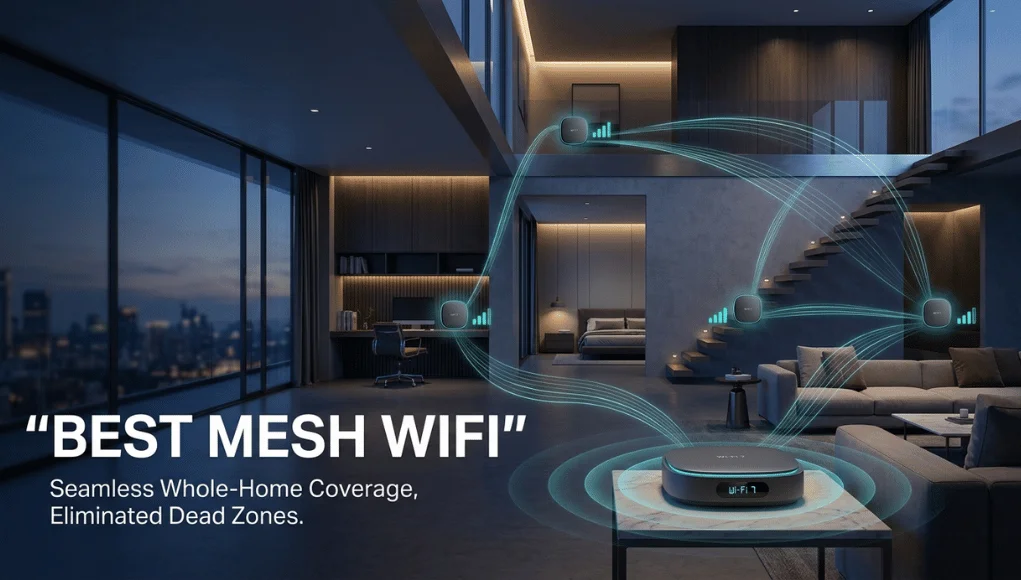
The best mesh WiFi for most homes is a two- or three-node kit in roughly the $180 to $400 range, ideally with the nodes wired back to the main router where your walls allow. Dead zones are a coverage problem, not a speed problem: if the back bedroom drops video calls while the living room streams 4K, more well-placed access points fix it, while a faster internet plan does not. Our top pick for most people is a tri-band Wi-Fi 7 three-pack such as the TP-Link Deco BE63; budget buyers in smaller homes can drop to the Deco BE23, and anyone who wants the simplest setup should look at the eero Pro 7. Below are six systems worth buying, then the details most roundups skip: node counts, wired backhaul, your ISP gateway and the subscription costs that arrive after purchase.
The short answer
- Buy a three-pack in the $180 to $300 range and connect the nodes to your router with a cable if you can.
- Tri-band kits above $500 only pay off on gigabit or multi-gig fiber in a large or awkward house.
- Check which features need a paid subscription before you buy.
- Wi-Fi 7 is worth it on fast fiber and with new devices, not on a 300 Mbps plan with older laptops.
Six mesh WiFi systems worth your money in 2026
Prices below are approximate US list prices at the time of writing. Street prices move often, and sales events such as Black Friday can cut them sharply, so check current pricing before you buy.
| System | Wi-Fi standard | Approx. price | Best for | Watch out for |
|---|---|---|---|---|
| TP-Link Deco BE23 (3-pack) | Wi-Fi 7, dual-band | About $180 | Apartments and small homes on 300 Mbps or less | No 6 GHz band, so node traffic shares the 5 GHz lane |
| TP-Link Deco BE63 / Deco 7 Pro | Wi-Fi 7, tri-band | $200 to $390 | Most three-bedroom houses | Advanced security and parental tools are a paid add-on |
| eero Pro 7 | Wi-Fi 7, tri-band | About $300 | Fast, simple setup | Many useful extras sit behind eero Plus |
| Netgear Orbi 770 | Wi-Fi 7, tri-band | From about $550 | Wide single-story layouts | Armor security renews yearly |
| Acer Predator Connect T7 | Wi-Fi 7, tri-band | About $330 per unit | Gaming and latency-sensitive homes | Sold per unit, so a whole-house setup adds up |
| Asus ZenWiFi BQ16 Pro (2-pack) | Wi-Fi 7, quad-band | About $1,000 | Multi-gig fiber in a large house | Overkill below 1 Gbps |
Best overall: TP-Link Deco BE63
A tri-band Wi-Fi 7 three-pack with multi-gig Ethernet ports, which makes wired backhaul easy, and a dedicated radio so nodes can talk to each other without eating into device bandwidth. Independent testing sites regularly rank it at or near the top. The downside is that the better security tools sit behind TP-Link’s HomeShield subscription, and the app promotes them heavily.
Best budget: TP-Link Deco BE23
If your plan is 300 Mbps or less and your home is under about 1,500 sq ft, this dual-band kit covers the basics for much less. Without a 6 GHz band, it works best when nodes are close together or wired.
Easiest setup: eero Pro 7
eero’s app gets most people online in minutes and handles updates automatically. Choose it if simplicity matters more than tinkering, and budget for eero Plus if you want its security and parental features.
Best for big homes and gamers
The Netgear Orbi 770 suits wide, single-story layouts, the Acer Predator Connect T7 targets low latency for gaming, and the Asus ZenWiFi BQ16 Pro is for multi-gig fiber in large houses. All three cost significantly more, so make sure your plan and devices can use the extra capability.
Your internet plan sets the ceiling
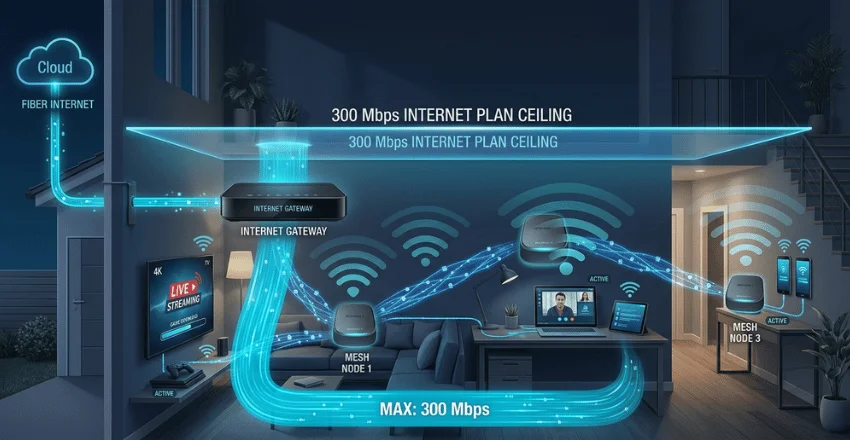
A mesh system spreads the connection you already pay for around your home. It does not create bandwidth. On a 300 Mbps plan, three nodes still deliver at most 300 Mbps, and a $1,000 kit gains you nothing over a well-placed $200 one. Where mesh does make things faster is at the edges: a laptop that crawls at 40 Mbps in a far bedroom can jump several times higher once a node sits much closer.
Work out what your household actually uses. A single 4K stream typically needs roughly 15 to 25 Mbps, which matters if you watch on a big screen like those in our best 75-inch TV guide. Two 4K streams, a video call and a game download all fit comfortably inside 300 Mbps. If you use fixed wireless or 5G home internet, our T-Mobile 5G Home Internet speed guide shows what those plans typically deliver, which sets the ceiling for any mesh kit behind them.
How many nodes you need, and where to put them
Square footage is only a starting point; wall construction matters more. A 1,800 sq ft house with drywall is a very different job from one of the same size with plaster, brick or foil-backed insulation.
| Home size and type | Suggested setup |
|---|---|
| Apartment or up to about 1,500 sq ft | Two nodes |
| About 1,500 to 3,000 sq ft | Three nodes |
| Over 3,000 sq ft, plaster or brick walls, or a detached garage or office | Three nodes with at least one wired connection |
- Place satellites halfway: put each node about halfway between the router and the dead zone, not in the dead zone itself.
- Keep them in the open: chest height or higher, away from cabinets, TVs, fish tanks and large metal objects.
- Stack vertically in two-story homes: signal travels through one floor better than through several walls.
- Do not overdo it: each wireless node relays traffic, and every relay costs throughput, so a badly placed extra node can slow the network.
Wired backhaul: the upgrade nobody sells you
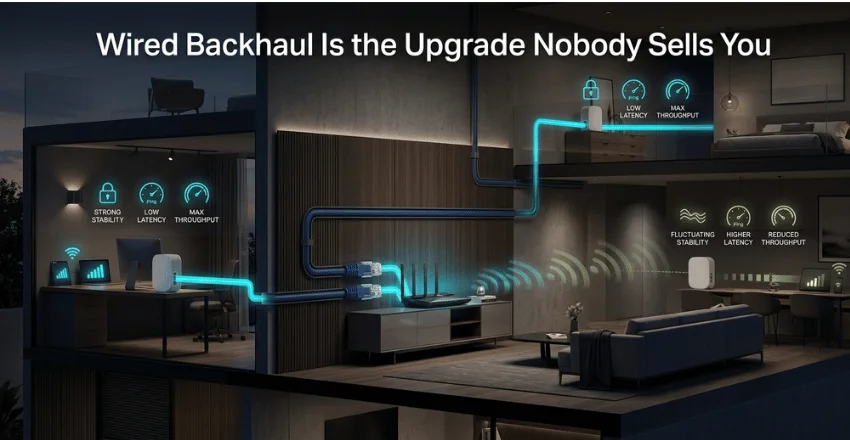
A node that talks to the router over the air spends part of its radio time relaying. Connect it with a cable and that penalty disappears. There are three main ways to do it:
| Method | How it works | Pros | Cons |
|---|---|---|---|
| Ethernet (Cat 6) | Cable between nodes | Fastest and most reliable, cheap parts | Needs a route through attic, basement or baseboards |
| MoCA | Adapters send data over existing coax TV cable | Near-Ethernet performance, no new wiring; a pair often costs roughly $100 to $150 | Needs coax outlets where you want nodes |
| Powerline | Adapters use electrical wiring | Cheapest to try | Least predictable, dislikes surge protectors |
A $200 dual-band kit on wired backhaul will often outperform a $500 tri-band kit running wirelessly. It is the most cost-effective upgrade in home networking.
Your ISP gateway, bridge mode and rental fees
You probably already have a router: the ISP gateway next to your TV. Plug a mesh kit in behind it without changing anything, and you get double NAT, with two routers each handing out addresses. Game consoles, VPNs and smart home hubs often misbehave as a result.
The fix is bridge mode. Either ask your provider or log into the gateway’s admin page and switch it from router mode to bridge or modem-only mode, so your mesh system runs the network on its own. If your gateway cannot be bridged, many mesh systems offer an access point mode instead.
Also look at what you pay to rent equipment. ISP whole-home WiFi add-ons commonly cost around $10 to $15 a month, which is $240 to $360 over two years. A kit you own outright usually pays for itself within that time and moves with you if you switch providers.
Wi-Fi 7 and MLO: do your devices care?
Wi-Fi 7 sells on two features: wider channels in the 6 GHz band, and Multi-Link Operation (MLO), which lets a device use two bands at once. Both are real improvements, but only for devices that support Wi-Fi 7 themselves. A household of older laptops, phones and tablets will see little benefit from MLO.
Tri-band kits still help for a different reason: the extra radio can carry traffic between nodes rather than competing with your devices. Note that 6 GHz signals fade through walls faster than 5 GHz, so nodes relying on 6 GHz backhaul need to sit closer together. As a rule of thumb, on plans under about 500 Mbps with older devices, a good Wi-Fi 6 system is fine and often cheaper. Above that, or if new phones and laptops are coming, choose Wi-Fi 7.
The subscription costs reviews leave out
| Subscription | Monthly (approx.) | Yearly (approx.) |
|---|---|---|
| eero Plus | $9.99 | $99.99 |
| TP-Link HomeShield Security+ | $4.99 | $35.99 |
| TP-Link HomeShield parental controls | $2.99 | $17.99 |
| TP-Link HomeShield Total Security | Yearly only | $69.99 first year, higher on renewal |
Over the life of the hardware, these add up. An eero Plus subscription at around $100 a year costs close to $300 over three years, roughly the price of the eero Pro 7 itself. Before buying, check whether the features you care about, such as parental controls, ad blocking or device quarantine, are free in the app or tied to a renewal. Pricing can change, so confirm on the manufacturer’s site.
Mesh vs a WiFi extender
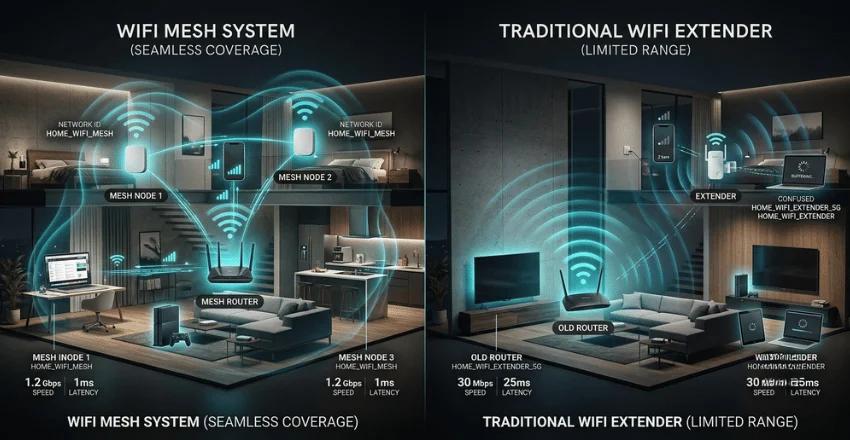
An extender rebroadcasts your router’s signal, often under a second network name, and phones tend to cling to the weaker signal as you move. Mesh nodes share one network name and hand devices over as you walk around. Extenders still make sense for one dead corner in a rented apartment. For a whole floor, mesh is the better buy.
Remember that a mesh system is a router, not a modem. If your service arrives over cable or DSL, you still need a modem. Fiber and 5G home internet usually combine both in the provider’s box.
Setup checklist for the first week
- Put your ISP gateway in bridge mode, or use the mesh kit’s access point mode.
- Connect the main node to the modem or gateway and complete the app setup.
- Reuse your old network name and password so devices reconnect automatically.
- Place satellites halfway to problem areas and wire them if possible.
- Update firmware on all nodes.
- Walk every room with a speed test app while the return window is still open, and try a video call as you move between nodes.
- If a dead zone remains, move the satellite before blaming the hardware.
Frequently asked questions
What is the best mesh WiFi system for a two-story house?
A tri-band three-pack, with one node upstairs roughly above the router. Stack nodes vertically where you can, because signal passes through a floor more easily than through several walls.
How many mesh nodes do I need for 2,000 square feet?
Usually three, or two if the layout is open and the walls are drywall. Start with two and add a third only if testing shows a gap.
Will mesh WiFi make my internet faster?
In dead spots, often by several times. Next to your router, no. Your internet plan sets the maximum speed.
Is Wi-Fi 7 mesh worth the extra money?
It is worth it on fiber above about 500 Mbps or when your phones and laptops already support Wi-Fi 7. Otherwise a Wi-Fi 6 kit does a similar job for less.
Can I keep my ISP router with a mesh system?
Yes, but set it to bridge or modem-only mode. Leaving it in router mode alongside mesh causes double NAT, which can break gaming, VPNs and smart home devices.