


What is 2K resolution? We can understand it as a specific level of display clarity that sits between standard Full HD and higher resolutions like 4K. It has a horizontal pixel count of around 2000 pixels, with the most recognized format being 2048 by 1080 pixels. The cinema industry primarily uses this resolution to produce and project films with precise detail and smooth visual quality.
The concept behind 2K is not just about numbers, but about achieving a balance between visual performance and practical efficiency. It delivers sharp and crisp images that are suitable for professional filmmaking, editing, and postproduction, while also keeping data sizes and processing requirements manageable.
Unlike consumer-focused resolutions, 2K follows a slightly wider aspect ratio, which allows filmmakers more flexibility in framing scenes and composing shots. Although many people casually refer to other resolutions as 2K, the true definition remains tied to cinema standards.
| Section / Topic | Key Idea / Summary |
| What is 2K Resolution? | 2K resolution is 2048 by 1080 pixels, used mainly in cinema and professional work |
| Concept of Resolution | Resolution refers to pixel count; more pixels mean better clarity and detail |
| Origin of 2K | Named after ~2000 horizontal pixels, similar to the 4K naming system |
| Technical Details | 2048 by 1080 pixels, ~2.2 million pixels, 17:9 aspect ratio |
| 2K vs 1080p | 2K is slightly wider; 1080p is more common in consumer devices |
| Misuse of Term 2K | 1080p or 1440p is often incorrectly called 2K in marketing |
| Types of 2K | DCI 2K (2048×1080) is official; 1440p is often mislabeled as 2K |
| 2K vs 1440p | 1440p has more pixels and better clarity than true 2K |
| 2K vs 4K | 4K has 4 times more pixels; 2K is more efficient and less demanding |
| Applications | Used in cinema, video editing, broadcasting, and some graphics work |
| Advantages | Balanced quality, faster processing, lower storage, and cost-effective |
| Disadvantages | Limited adoption, confusion, and less future-proof |
| Gaming Use | 1440p and 4K preferred; true 2K rarely used |
| Video Editing | Ideal for faster rendering and efficient workflow |
| Future of 2K | Still useful in professional fields, but declining in consumer use |
| Overall Conclusion | 2K is a balance between quality and efficiency, which is mainly important in cinema |
Understanding the Concept of Resolution
Resolution refers to the number of pixels displayed on a screen. Pixels are tiny dots that combine to form an image. The higher the number of pixels, the sharper and more detailed the image appears.
Resolution is usually written as width multiplied by height. For example, a screen with 1920 by 1080 pixels has a total of over 2 million pixels.
Higher resolution means:
- Better clarity
- More detail
- Improved viewing experience
- However, it also requires more processing power and storage.
What Is 2K Resolution?
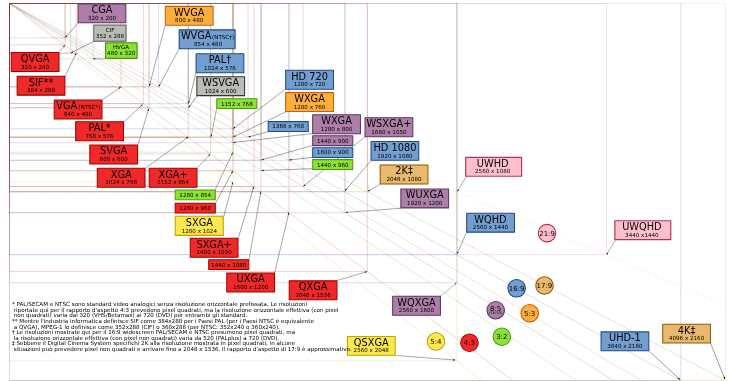
What is 2K resolution? It is a commonly asked question when discussing display technology and digital imaging. 2K resolution refers to a display standard that has approximately 2000 pixels in the horizontal direction, with the most accurate and widely accepted form being 2048 by 1080 pixels.
The Digital Cinema Initiatives define this resolution as part of their standards, and the film and cinema industry mainly uses it to produce and project high-quality visuals. The term 2K comes from the horizontal pixel count, where the width of the image is close to 2000 pixels, making it a convenient and simple way to describe the resolution.
Although people often confuse it with formats such as 1080p or 1440p, true 2K has a slightly wider frame than Full HD and uses a different aspect ratio, typically 17:9 instead of 16:9. In practical use, 2K provides a clear and detailed image quality that is suitable for professional video editing, film production, and cinematic presentations.
Origin of the Term 2K
The term 2K comes from the horizontal pixel count, where the value 2048 is close to 2000, leading to the name 2K. This naming method is similar to 4K resolution, which refers to approximately 4000 horizontal pixels. Unlike formats such as 1080p or 1440p that focus on vertical resolution, the 2K naming system is based on width, which can sometimes make it confusing for people when comparing different resolution standards.
Technical Specifications of 2K Resolution
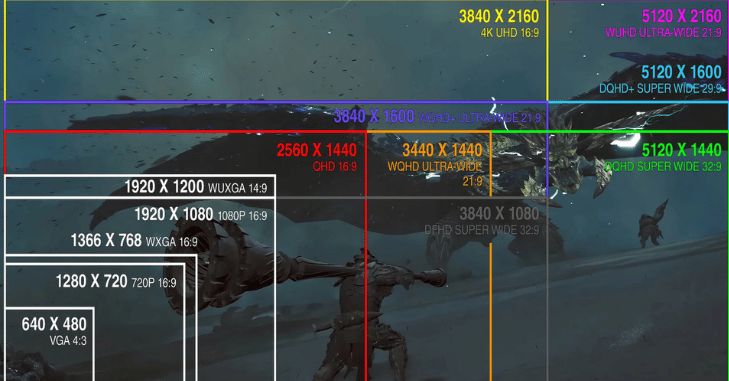
Understanding the technical aspects helps clarify where 2K stands among other resolutions.
- Resolution size: 2048 by 1080 pixels
- Total pixel count: around 2.2 million pixels
- Aspect ratio: typically 17 to 9
- Standard use: digital cinema and film production
- The slightly wider aspect ratio compared to 16 to 9 gives filmmakers more flexibility in framing scenes.
Difference Between 2K and 1080p
| Feature | 1080p Resolution | 2K Resolution |
| Pixel Size | 1920 by 1080 pixels | 2048 by 1080 pixels |
| Aspect Ratio | 16 to 9 | 17 to 9 |
| Common Usage | TVs, laptops, streaming | Cinema production and projection |
| Width | Slightly narrower | Slightly wider |
| Visual Difference | Very minimal for most viewers | Very minimal for most viewers |
Why do people often call 1080p “2K”?
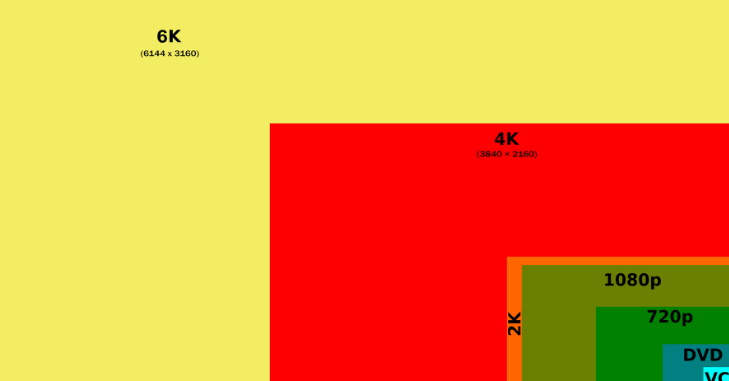
In everyday usage, many people and even companies refer to 1080p as 2K. This is technically incorrect but has become common in marketing.
This confusion happens because:
- Both resolutions are close in pixel count
- The term 2K sounds more advanced
- Consumers are more familiar with simplified naming
- Despite this, true 2K strictly refers to 2048 by 1080 resolution.
Different Types of 2K Resolution
DCI 2K
This is the official and industry-standard version of 2K resolution, defined as 2048 by 1080 pixels. Cinema production and projection primarily use this format, and the film industry relies on it to deliver high-quality visuals.
Consumer Mislabeling
Some manufacturers refer to a resolution of 2560 by 1440 as 2K, but this is not technically accurate. In reality, this resolution is better described as Quad HD or 1440p, as it exceeds the true 2K standard in terms of pixel count and clarity.
2K vs 1440p Resolution

One of the most common misunderstandings is between 2K and 1440p.
1440p resolution:
- 2560 by 1440 pixels
- Around 3.7 million pixels
- Common in gaming monitors
- 2048 by 1080 pixels
- Around 2.2 million pixels
1440p provides significantly more detail and clarity compared to true 2K. This is why gamers often prefer 1440p for a balance between performance and image quality.
2K vs 4K Resolution
4K resolution is much higher than 2K and is becoming more common in modern devices.
4K resolution:
- 3840 by 2160 pixels in consumer displays
- Around 8 million pixels
- 4K has four times more pixels
- Offers sharper and more detailed images
- Requires more powerful hardware and storage
While 4K delivers superior quality, 2K remains useful for situations where performance and efficiency are more important.
Applications of 2K Resolution

2K resolution continues to play an important role across several industries due to its balance of quality and efficiency. It is widely used in movie theaters and film production, with many films still mastered in 2K because it delivers high visual quality while keeping file sizes manageable.
In video editing and post-production, professionals often prefer 2K because it allows for faster rendering than 4K, requires less storage space, and still maintains a professional level of output. Some systems and workflows continue to rely on 2K as a standard format for content production and distribution.
Although it is less common in gaming and graphics, certain games and cinematic experiences may still utilize 2K resolution, particularly in development and testing environments where performance and efficiency are important.
Advantages of 2K Resolution
| Benefit | Description |
| Balanced Image Quality | Better than standard HD without the heavy demands of 4K |
| Efficient Storage | Smaller file sizes make storage and management easier |
| Faster Processing | Smoother and quicker editing, rendering, and playback |
| Cost Effectiveness | More affordable equipment and workflows compared to higher resolutions |
Disadvantages of 2K Resolution

| Limitation | Description |
| Limited Consumer Adoption | Most consumer devices use 1080p, 1440p, or 4K instead of true 2K resolution |
| Confusion in Terminology | Many people misunderstand 2K due to incorrect marketing and labeling |
| Less Future Ready | With 4K becoming standard, 2K may lose relevance over time |
Is 2K Resolution Good for Gaming?
True 2K is not widely used in gaming. Instead, gamers typically choose:
- 1080p for high performance
- 1440p for a balance of quality and speed
- 4K for maximum detail
- When gamers refer to 2K, they usually mean 1440p rather than true 2K resolution.
Is 2K Resolution Good for Video Editing?
Yes, 2K resolution is an excellent choice for video editing, particularly for professionals who want to maintain a strong balance between visual quality and overall efficiency. It provides clear and detailed images without the heavy processing demands associated with higher resolutions like 4K.
One of the main advantages of working in 2K is faster rendering times, which allows editors to complete projects more quickly. In addition, 2K files require less storage space, making them easier to manage and archive. Another key benefit is smoother workflow performance, as editing software runs more efficiently with lower-resolution footage compared to ultra-high-definition formats.
Due to these advantages, 2K resolution continues to be widely used in film production pipelines, offering a practical and reliable solution for both editing and post-production work.
Should You Choose a 2K Display?
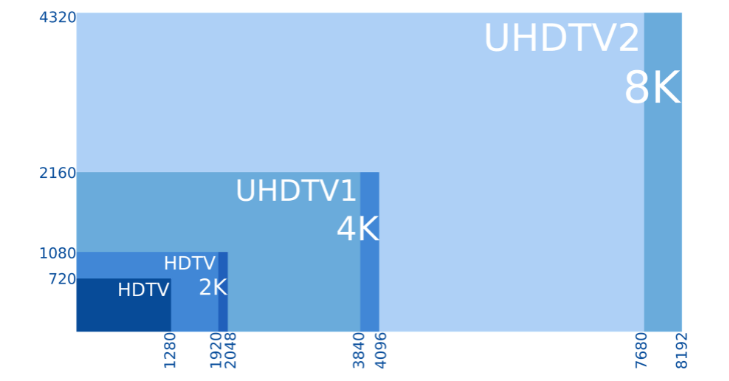
Choosing a display depends on your needs and usage.
2K may be suitable if:
- You work in film production
- You need efficient performance
- 1080p is more common and affordable
- 1440p offers better clarity
- 4K provides the greatest detail
Common Misconceptions About 2K
There are several myths surrounding 2K resolution that often lead to confusion among users. Many people believe that 2K is the same as 1440p, but this is incorrect because true 2K resolution is defined as 2048 by 1080 pixels, while 1440p, also known as Quad HD, has a higher resolution of 2560 by 1440 pixels and therefore provides more detail and clarity.
Some people also assume that 2K is outdated due to the rise of 4K and even 8K technologies, but this is not entirely true. 2K continues to play a vital role in professional environments, especially in cinema production and film editing, where professionals value it for its balance of quality, efficiency, and manageable file sizes.
Conclusion
What is 2K resolution? 2K resolution stands as a vital and balanced display standard that bridges the gap between Full HD and 4K, offering both clarity and efficiency. With its official specification of 2048 by 1080 pixels, it remains deeply rooted in the cinema industry, where precision, wide aspect ratio, and high-quality visuals are essential.
Throughout this guide, it becomes clear that 2K is not just about pixel count but about achieving an optimal balance between performance, storage efficiency, and visual excellence. It continues to play an important role in professional fields such as film production, video editing, and broadcasting, where faster processing and manageable file sizes are crucial.
Want to know about Solve Intelligence: Revolutionizing Global Innovation Through Advanced AI-Driven Intellectual Property and… Check out our Tech category.
FAQs
2K resolution refers to a display standard with 2048 by 1080 pixels, commonly used in cinema and professional film production for high-quality visuals.
No, 2K (2048 by 1080) is slightly wider than 1080p (1920 by 1080), although the difference is minimal in everyday viewing.
No, 4K has a much higher resolution and more detail than 2K, but 2K is more efficient and requires less processing power.
2K is widely used in the film industry because it provides high-quality visuals while keeping file sizes and processing requirements manageable.
2K is not commonly used for gaming, where 1440p or 4K is preferred, but it is excellent for video editing due to faster rendering and efficient workflow performance.